The previous item fetches a Video Lesson’s Duration from Bunny when the Instructor saves the Lesson. That covers the case where the video was already there. It leaves three where it wasn’t:
- a Lesson saved before Durations existed, which has none;
- a Lesson whose video was re-uploaded to Bunny since, which keeps a number that is now wrong;
- a Lesson saved while its video was still transcoding, which got nothing, because Bunny only reports a real length once the status reaches
Finished.
The third one is not an edge case. Uploading a video and immediately pasting its URL into the Lesson is the normal way to do this, and it lands here every single time. So this is not a repair tool bolted on for rare breakage — it is the second half of a two-step workflow, and it needs to read like one.
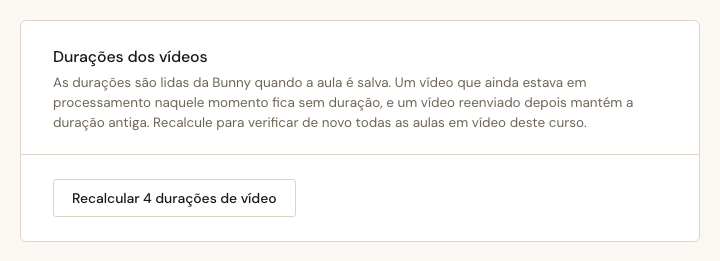
The summary is the whole feature
A count would have been easier. 11 durations recalculated. Done.
But the two failure modes call for opposite actions from the Instructor, and a single number hides which one happened:
- still processing — Bunny is working, come back in a minute and press it again;
- failed — something is wrong and pressing it again will not help.
So the summary names all three outcomes separately, always, including the zeros:
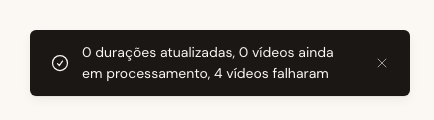
This is also the item that justifies a decision made one item earlier, before there was any caller for it. The Bunny client answers with three outcomes — {:ok, seconds}, {:not_ready, status}, {:error, reason} — even though the save path treats the last two identically. The refinement notes said it out loud: “the client answers with three outcomes and the save path collapses the last two.” Had the client collapsed them itself, this summary would be unbuildable without going back and re-widening the layer beneath it.
One classification is worth stating because it looks arbitrary and isn’t: a video_url that yields no library/video id counts as failed, not as still processing. Waiting fixes a transcoding video. Nothing about a malformed URL improves with time.
flowchart LR
    A["every Video Lesson
in this Course"] --> B["Courses.fetch_duration/1"]
    B --> C{"outcome"}
    C -->|"{:ok, seconds}"| D["updated
written"]
    C -->|"{:not_ready, status}"| E["processing
stored value kept"]
    C -->|"{:error, reason}"| F["failed
stored value kept"]
    D --> G["8 durations updated,
2 still processing,
1 failed"]
    E --> G
    F --> G

    style D fill:#dce8dc,stroke:#5f7a5f
    style E fill:#f0e8dc,stroke:#a08560
    style F fill:#f0dcdc,stroke:#a06060
The arrows out of processing and failed matter as much as the one out of updated. A re-check that produces no usable number leaves the stored Duration alone. A Bunny outage must never turn a Course full of correct durations into a Course full of blanks.
Synchronous, and the condition under which that stops being true
The handler fetches one Lesson at a time and answers when it is done. phx-disable-with covers the feedback, which also makes it impossible to press twice at once — the same thing the five existing save buttons in this app do.
The reason is not “async is hard”. It is that Task.async, start_async and assign_async appear nowhere in lib/. Introducing the codebase’s first piece of asynchronous work, plus in-progress state in a LiveView, for a wait currently measured in single-digit seconds, would be the more surprising choice — and surprising is the thing this project’s ADR criteria are actually about.
That decision has a written expiry, recorded with it: it is right for a handful of videos per Course and wrong for dozens, and the thing that breaks first is the LiveView event timing out, not anything subtle.
There was an escape hatch worth checking. Bunny’s list-videos endpoint returns VideoModels, which carry both length and status — in principle one call instead of N. I did not wire it up and did not test it against the live API, and two things turn it from a simplification into a bigger change: it is paginated, and it assumes every video in a Course lives in the same library, which is not guaranteed — the library id comes out of each Lesson’s own video_url. Recorded as an option for when a Course gets large, rather than done speculatively today.
A class that was already declared twice
The section needed a card. The design system draws one — .settings-section, white, a bordered head, a padded body — and the Course settings tab already uses that markup.
It renders flat. app.css declares .settings-section twice:
/* line 1100 — the design system's card */
.settings-section { background: #fff; border: var(--border); border-radius: var(--r-md); }
.settings-section-head { padding: var(--sp-5) var(--sp-6); border-bottom: var(--border); }

/* line 3193 — the Server Settings page, added later */
.settings-section { background: var(--paper-50); padding: var(--sp-6); max-width: 640px; }
The later one wins for every property it names. So the Course thumbnail and Introduction video sections on the Landing page tab have been rendering as flat paper-50 blocks with doubled padding, not as the white cards they were drawn as — for long enough that nobody noticed, because you only see it with the prototype open beside the app.
This is exactly the hazard CLAUDE.md documents for daisyUI, except both halves are ours. And it is not this item’s job to fix: un-collapsing it changes the Landing page tab’s appearance, which is a deliberate visual decision that deserves its own Card. So the new section is mm-settings-action — prefixed, carrying the design system’s values, sized to match the mm-form-card beside it, and not a seventh victim of a collision it did not create.
The Card exists now. That is the honest version of “I found a bug while doing something else”: write it down, step around it, don’t smuggle the fix into an unrelated diff.
What the browser could and could not prove
Dev has no BUNNY_API_KEY, which means Bunny answers 401 for every video. That sounds like a limitation and turned out to be the most useful run available: it is a real total failure, not a mocked one, and it proved the property that matters most.
Before: 250, 702, 42, nil. After a recalculation where every single fetch failed: 250, 702, 42, nil. Byte for byte.
What the browser could not show is the interesting summary — one updated, two processing, one failed — because producing it needs a Bunny that answers three different ways. That lives in the LiveView test against the mock, and it is worth being precise about which claims rest on which evidence rather than implying the screenshots covered everything.
The section that isn’t there
A Course with no Video Lessons shows no section at all. Not a disabled button, not an empty state — nothing.
A button whose only possible report is 0 durations updated, 0 still processing, 0 failed is not a control; it is a question the Instructor has no reason to ask. The platform already does this elsewhere: the Bibliography disappears when a Course has no References. Suppressing a section with nothing in it is a habit here, not a special case.