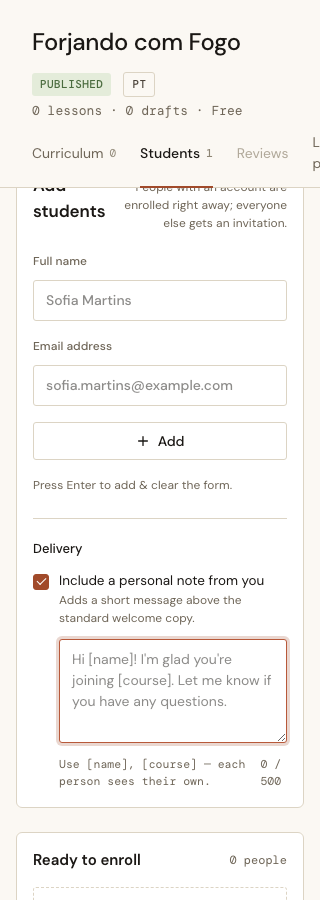
An Instructor pastes a roster and every person on it gets the same email: someone has invited you to this course, sign up here. It is correct, it is transactional, and it reads exactly like what it is. The people on that roster are usually the Instructor’s own customers — they are being written to by a person they have met, in a voice that sounds like a receipt.
So the Delivery section grew a textarea.
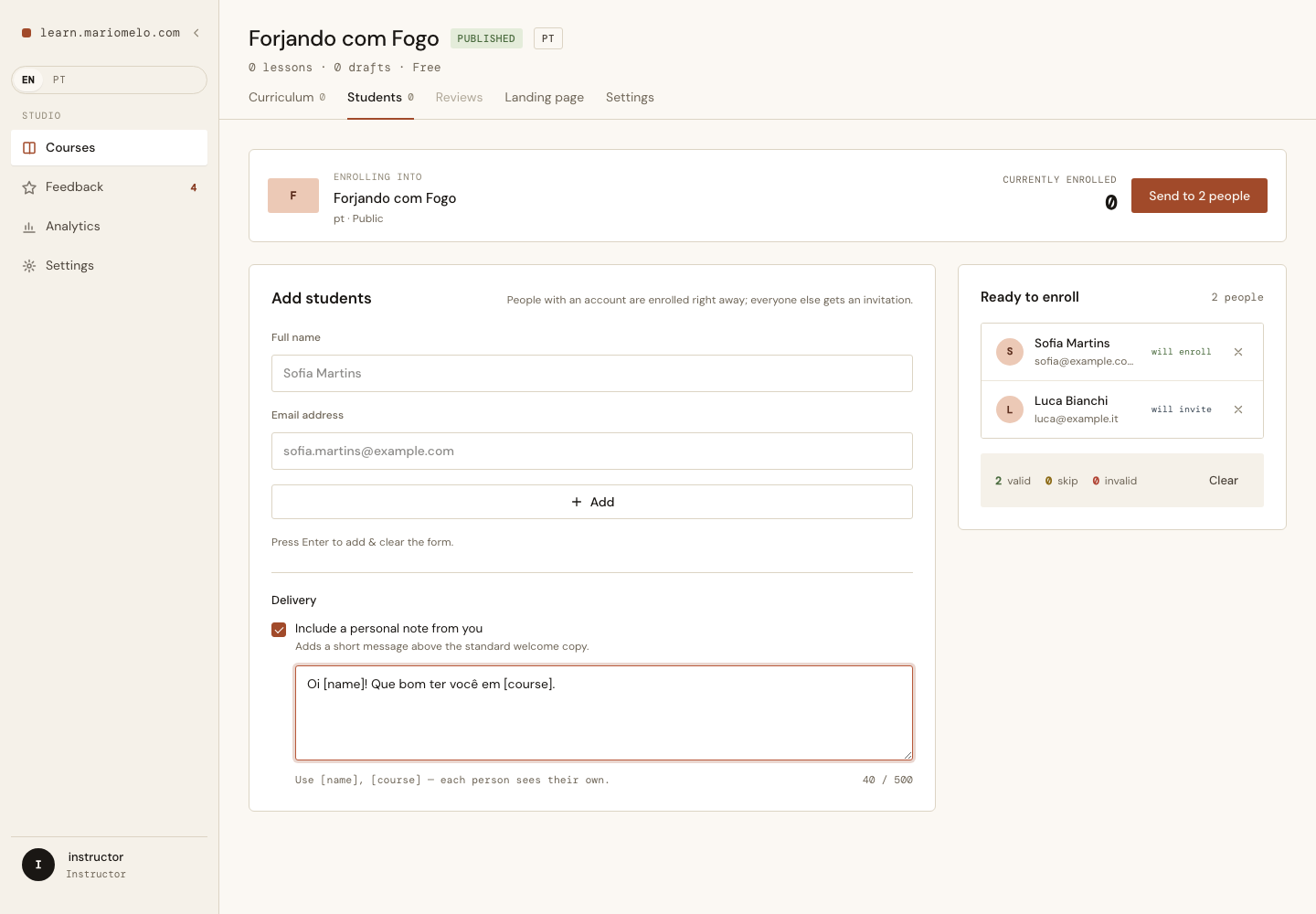
The item that ate the other item
This started as two backlog items. One was a transient personal note — a plain box, typed per send, not stored. The other was a personalized message with fields like [name] that fill themselves in.
They are the same textarea. Building the plain one first and reopening it a month later to add merge fields is pure rework, and the merge fields are the entire reason the feature is worth anything: a note without them is one message sent to forty people, which is a form letter with extra steps.
The tempting fix is to merge both items into one. That rebuilds the bulge that forced the original split — the whole enrollment screen in a single slice. So the seam moved instead of dissolving: this item is the message, built once, with merge fields; the CSV bulk paste is its own item, still waiting. The message does not depend on bulk entry. A single invitation in the Instructor’s own words already has value, which is the test for whether a slice is really a slice.
Two fields, and the explicit refusal to add a third
[name] and [course]. Matched case-insensitively, so [Name] and [NAME] work — nobody should have to remember which one they typed.
[instructor] was proposed and cut. The standard copy already names the Instructor one paragraph down; a signature merged in above it reads as a duplicate, not a personalization.
The point of stopping at two is that two fields is a String.replace. Three is the beginning of a template language, and a template language wants conditionals, and conditionals want a parser, and a parser inside an email wants tests for the failure modes of a language nobody asked for. The non-goal is written down in the item, because “why doesn’t this support loops” is a question that will be asked eventually and deserves an answer better than we forgot.
[name] is the name in the row. Always.
Some of the people on that roster already have accounts, and those accounts have Profile names. So [name] could resolve two ways: the name the Instructor typed into the row, or the name stored on the recipient’s Profile.
It is always the row.
flowchart TD
    M["message, as typed
Hi [name], welcome to [course]!"] --> R["merge — per row"]
    W["the row: name + email"] --> R
    R --> S{"confirmed account
for this email?"}
    S -- yes --> E{"already enrolled?"}
    E -- yes --> K["skipped
no email, so no message"]
    E -- no --> EN["Enrollment created
+ enrollment notification"]
    S -- no --> I{"already invited?"}
    I -- yes --> K
    I -- no --> IN["Invitation created
+ course invitation"]
    EN --> B["message in both parts,
above the standard copy"]
    IN --> B
Three reasons, in order of how much they mattered. It makes the merge WYSIWYG against the preview list sitting right there on screen — the Instructor can read Sofia Martins in the row and know that is what Sofia gets. It keeps one rule for every recipient, instead of a rule that silently changes based on account state the Instructor cannot see and did not create. And it avoids a get_profile/1 per row across a batch.
The accepted cost is that a typo in a row reaches the email. That typo is visible in the preview before anyone clicks Send, which is more than can be said for a Profile name pulled from a database the Instructor has never looked at.
Note where the merge happens in that diagram: per row, before the branch. Both emails carry the message. The enrolled/invited split is an internal consequence of who already happens to have an account — the Instructor wrote one message for one batch, and dropping it for half the recipients would read as a bug. Skipped rows get no email at all, which is unchanged; idempotency was already the rule and the message does not touch it.
Square brackets are also just punctuation
Type [nome] instead of [name] and something has to happen. There were three candidate somethings.
Strip it — no. “See [the syllabus] I attached” is ordinary prose, and a feature that eats words out of the middle of someone’s sentence is worse than the typo it was guarding against.
Block the send — no. That refuses a perfectly good message over a bracket that was meant literally.
Send it verbatim, and say so.
![The warning naming [nome] and [curso], listing the real fields, with Send still enabled](/posts/personalized-invitation-message/02-unknown-placeholder-warning.png)
Look at what the warning does not name. [o programa] — “the syllabus” — is sitting in that same message and is not flagged, because detection only considers bracket contents with no whitespace in them. A single token in brackets is plausibly a field someone half-remembered. A phrase in brackets is a person writing English. Getting this wrong in the noisy direction is how a warning becomes something you learn to scroll past.
And Send stays enabled, which is the whole point of the word non-blocking.
The debounce that would have eaten the last word
This is the constraint that shaped the implementation, and it is not obvious from looking at the screen.
The Send button is not in a form. It lives up in the header bar as a phx-click, and the only <form> on that screen is the one that adds a person to the list. So the message has to already be sitting in an assign by the time Send is clicked — there is no submit that will carry it along.
That means the textarea needs its own phx-change, and it needs its own <form> to hang it on, because a form cannot contain another form. Nest it inside the add-person form and the browser closes the outer one early; every input after that point silently stops submitting. Sibling, not child.
And that form carries no debounce. Not phx-debounce="300", not "blur".
sequenceDiagram
    autonumber
    participant I as Instructor
    participant B as Browser
    participant S as Server
    I->>B: …types the last word
    B->>S: phx-change (no debounce)
    S->>S: assign(:note, "…last word")
    I->>B: clicks Send — no blur, no pause
    B->>S: phx-click "send"
    S->>S: reads :note — complete
    Note over S: with a 300ms debounce the change
and the click race, and the tail
of the message is simply gone
Someone types the final word of their note and clicks Send. There is no blur. With a debounce, the change event and the click are in a race, and losing it means the last word — or on "blur", the entire message — never reaches the server. Nothing errors. Forty people get an email that stops mid-sentence.
Roughly five hundred tiny websocket messages is not a cost worth optimizing against that.
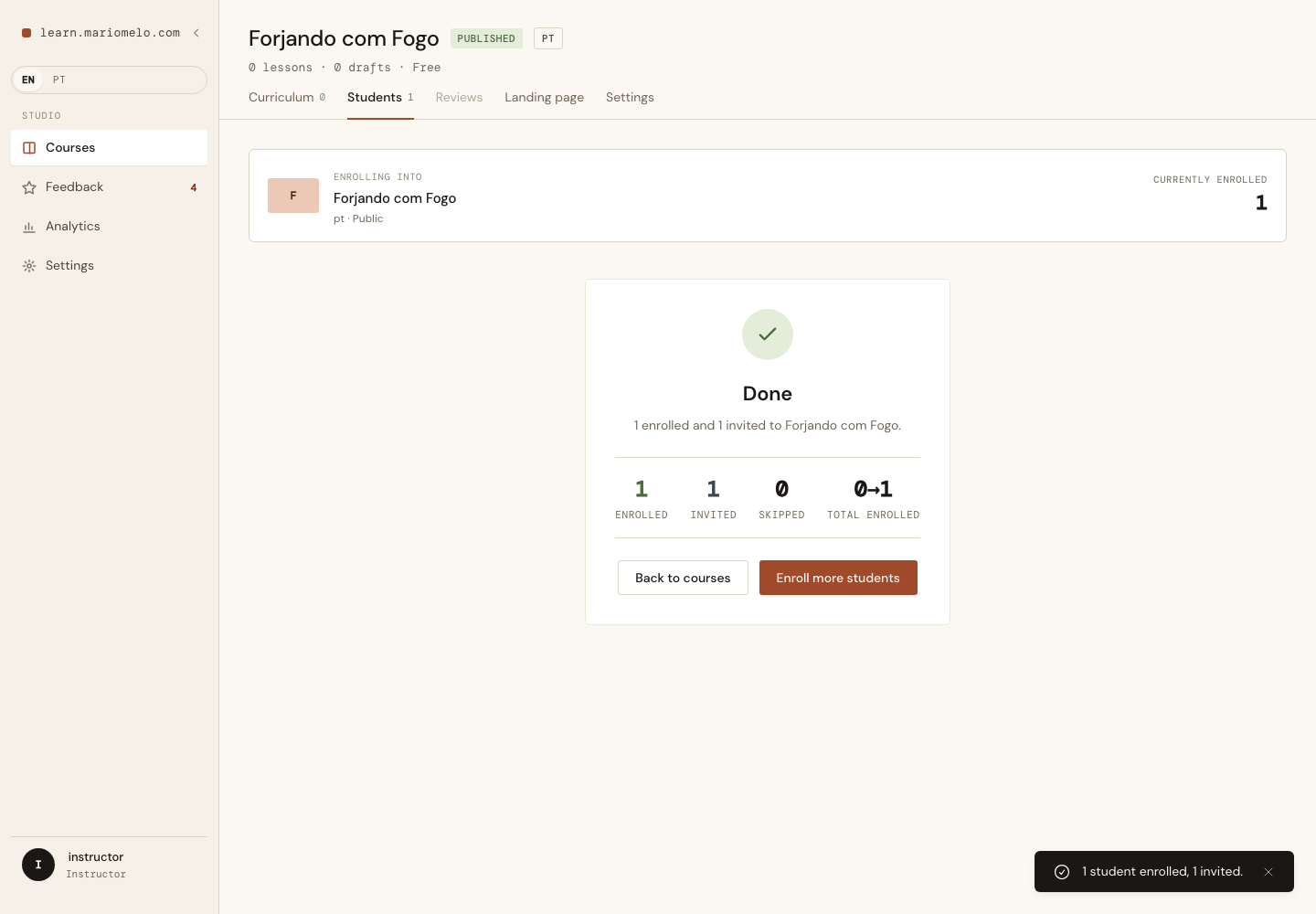
The uncomfortable part: ExUnit cannot see this bug. LiveViewTest dispatches precisely the events it is asked to dispatch and never reproduces browser timing, so a debounced version of this screen passes every test in the file. The verification script types the last word and clicks Send with nothing in between, in a real browser, because that is the only place the answer lives.
Reject; do not truncate
The textarea is maxlength="500", and the counter next to it is live. Five hundred characters is about eighty words — a warm note, not a letter. It counts characters as typed, so [name] costs six; counting the rendered length would make the number drift per recipient and be impossible to explain against a counter that is right there.
The server checks it too, and when it fails it refuses the whole send rather than trimming to fit. Past the browser’s own cap, an over-length message can only arrive from a tampered client — and the alternative, silently cutting somebody’s words off mid-sentence and mailing that to a whole batch, is comfortably the worst thing this feature could do.
What was in the design file and did not get built
The design prototype for this screen mocks three checkboxes under Delivery. One shipped.
Send enrollment email is true on every path there is. A checkbox that cannot be unchecked is worse than no checkbox — it implies a choice and then quietly ignores it. Bypass approval queue advertises a feature that does not exist; there is no approval queue.
Design files are proposals, not specifications. Two of those three were fiction, and shipping them would have been shipping a lie with rounded corners.
The toggle itself, though, stayed. An always-visible textarea would have made “no message” into an empty field you notice and ignore; a toggle makes it the explicit default. Toggle off — or on and blank — and both emails send exactly the copy they sent yesterday, with no empty panel where a message would have been.
The email had to borrow, not invent
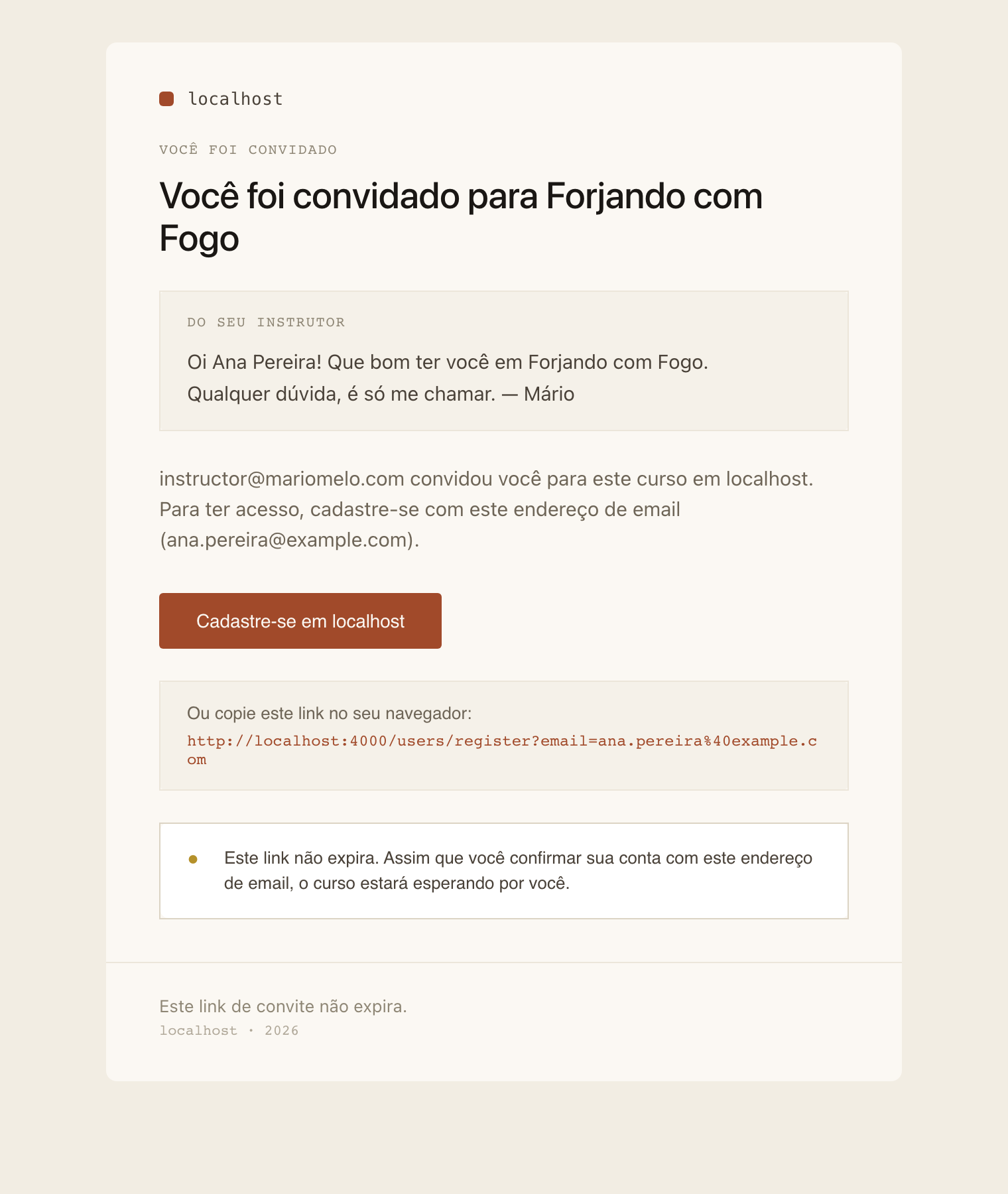
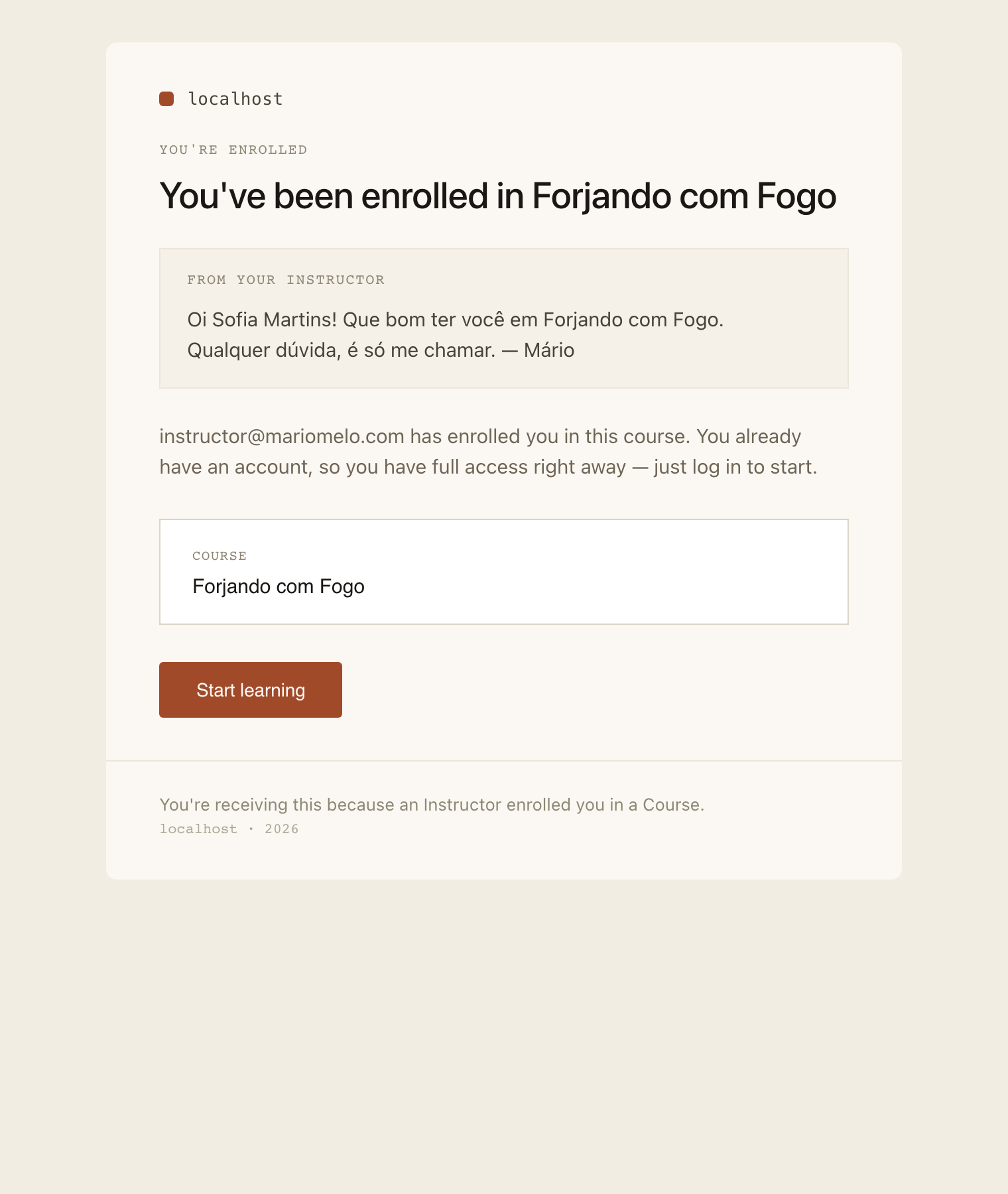
The block sits headline → message → standard paragraph → CTA. Course first for context, then the Instructor’s words, then the boilerplate.
It is not a new component. It is the inset panel that already renders “Or copy this link into your browser” two sections further down the same email — same paper fill, same border, same radius. The only change is the body colour: #4A4239 instead of the muted #6E6557 the boilerplate uses, because this is the part that is actually meant to be read.
The message is plain text. No Markdown, no HTML. A Markdown route needs a renderer and a sanitizer and an XSS surface inside an email, and we have a whole separate backlog item about sanitizing Markdown precisely because that is not free. HEEx escapes the message, newlines become <br>, and that is the extent of the interpretation.
The thing that looks like a bug in every screenshot
The surrounding email is translated into the recipient’s Preferred Language. The label above the message — From your instructor — is translated. The message itself never is.
It is the Instructor’s own words. Translating them would mean putting sentences in someone’s mouth that they did not write, signed with their name.
So a Portuguese-speaking recipient can get a Portuguese email frame wrapped around an English note, and it looks wrong in a screenshot every single time. It is recorded here deliberately so that the next person to notice it can find out it was a decision.
Nothing was persisted
No column, no migration. The message is typed per send, merged into the outgoing emails, and then it is gone.
An Instructor who sends several batches retypes it each time — that is the accepted cost, and it is worth being honest that it is a cost. It was taken because the alternative was a schema change to support a workflow nobody has complained about yet, and because adding a saved-per-Course default later is strictly additive: the same textarea, with a value prefilled into it. Nothing here forecloses that. Should an Instructor actually complain, the change is small.
Which is also why there is no ADR for any of this. Transient can become persisted; plain text can become Markdown; two merge fields can become five. Every decision in this item is cheaply reversible, and an ADR that records a reversible decision teaches the next reader that ADRs are where opinions go, rather than where hard-to-undo trade-offs go. The reasoning lives in the item’s Conversation.md.
A test that lied by returning false
One implementation note, because it cost real time and will cost it again.
Swoosh’s assert_email_sent/1 takes a function, and that function is a matcher — its return value decides whether the email matched. Write the assertions inside it in the natural order:
assert_email_sent(fn email ->
  assert email.text_body =~ "Hi Typed Name!"
  refute email.text_body =~ "Profile Name"
end)
…and the block ends in refute, which returns false. No exception is raised. Swoosh concludes that no email matched and fails with no matching email, printing the email that matched perfectly well right there in the output.
The fix is to put the refute anywhere but last. The lesson is that a block whose value is the assertion is a different thing from a block whose assertions raise, and it is worth knowing which kind you are inside.
Coverage
Substitution, case-insensitivity, unknown-field detection, blank handling and the length guard are pure functions on a struct-free module — nineteen async: true unit tests, no database. Everything the domain decides is decided there, and the LiveView only displays what it returns.
Integration tests were used exactly where infrastructure is genuinely required: eight for email delivery, proving the message reaches both emails in both parts, above the standard copy, escaped, with line breaks intact and the label translated while the body is not; and eight driving the real tracked form round-trip on the Students screen — render_change, then render_submit, then assertions against the database, never hand-built params.
Then the browser, for the three things none of that can see: the debounce race, the design fidelity, and whether the toggle is reachable by keyboard at all. It is — three tabs from the name field, Space opens the textarea, and focus lands inside it.