A Course that teaches Scrum should be able to point at the Scrum Guide. Until now it couldn’t: an Instructor could paste a link into a Lesson body and hope, and a Student who wanted the sources had to scroll back through every Lesson to collect them.
So: a Reference is a typed row attached to a Lesson — a type (book, link or video), a required title, an optional url, and an optional note saying why it’s worth reading. A Bibliography is the compiled, read-only list of every Reference in a Course, grouped by Chapter.
flowchart TD
    C[Course] --> CH[Chapter]
    CH --> L[Lesson
text or video]
    L -->|"references: jsonb array"| R[Reference
type · title · url · note]
    CH -.->|"grouped by, deduped within"| B[Bibliography
derived, nothing stored]
    R -.-> B
    L -->|rendered at its foot| E[Endnote]
    R -.-> E
Two things it deliberately isn’t
It isn’t a citation record. No author field, no year, no publisher, no ISBN, no APA or ABNT formatting. Those were rejected as authoring burden: for a link or a video, almost every one of those fields is empty, and the Instructor pays the cost on every single row to serve a format nobody asked for. The title is free text — write Sutherland, J. (2014). Scrum. Currency. if you want it to look like a citation.
A person isn’t a type. The original Card said “books, links, videos, people,” and the refinement dropped the fourth. A person is a link to their site, or a name in a note. A person type would have needed its own rendering, its own empty-URL semantics, and its own answer to “what does clicking it do” — for something two existing types already express.
Storage: jsonb, following a precedent rather than setting one
lessons.references is an {:array, :map} column. The rule of thumb for reaching for a table instead is does this thing have identity outside its parent — and a Reference doesn’t. It’s never shared between Lessons, it’s always loaded with its Lesson, and it’s edited as a whole block. word_match and sentence_selection already made exactly this call on this exact table, so this matches the codebase rather than surprising against it. That’s also why it isn’t an ADR: nothing here would puzzle a new reader who’d already seen the neighbouring columns.
Postgres hands jsonb back with string keys, and the project’s CLAUDE.md is blunt about what happens when you mix conventions — validation, templates and update events break in three different ways at once. So Forgia.Courses.Reference speaks string keys everywhere, with an atom fallback at the single read boundary for maps built in memory by a test or a seed:
@atom_keys %{"type" => :type, "title" => :title, "url" => :url, "note" => :note}

def get(ref, key) when is_map(ref) and is_binary(key) do
  case Map.get(ref, key) || Map.get(ref, @atom_keys[key]) do
    nil -> ""
    value when is_binary(value) -> value
    value -> to_string(value)
  end
end
That map is written out longhand rather than derived with String.to_existing_atom/1, which raises for any key whose atom no other module happens to have created — a failure that would appear only when some unrelated module stopped mentioning :note.
The authoring rows
Index-named inputs (lesson[references][0][title]), the same repeatable-row shape Course Highlights already established. They sit outside the <form> element and join it with form="lesson-form" — a nested <form> closes the outer one early, and every input after it silently stops submitting.
They also live behind a tab. The first cut stacked them below the two-pane Markdown editor, and the complaint came back within the hour: between the rows and the Free Preview checkbox, there was hardly any room left to write the Lesson in. So the editor became Content | References | Settings, and the Markdown pane got the full panel height back — 718px at 1440×900, measured rather than eyeballed.
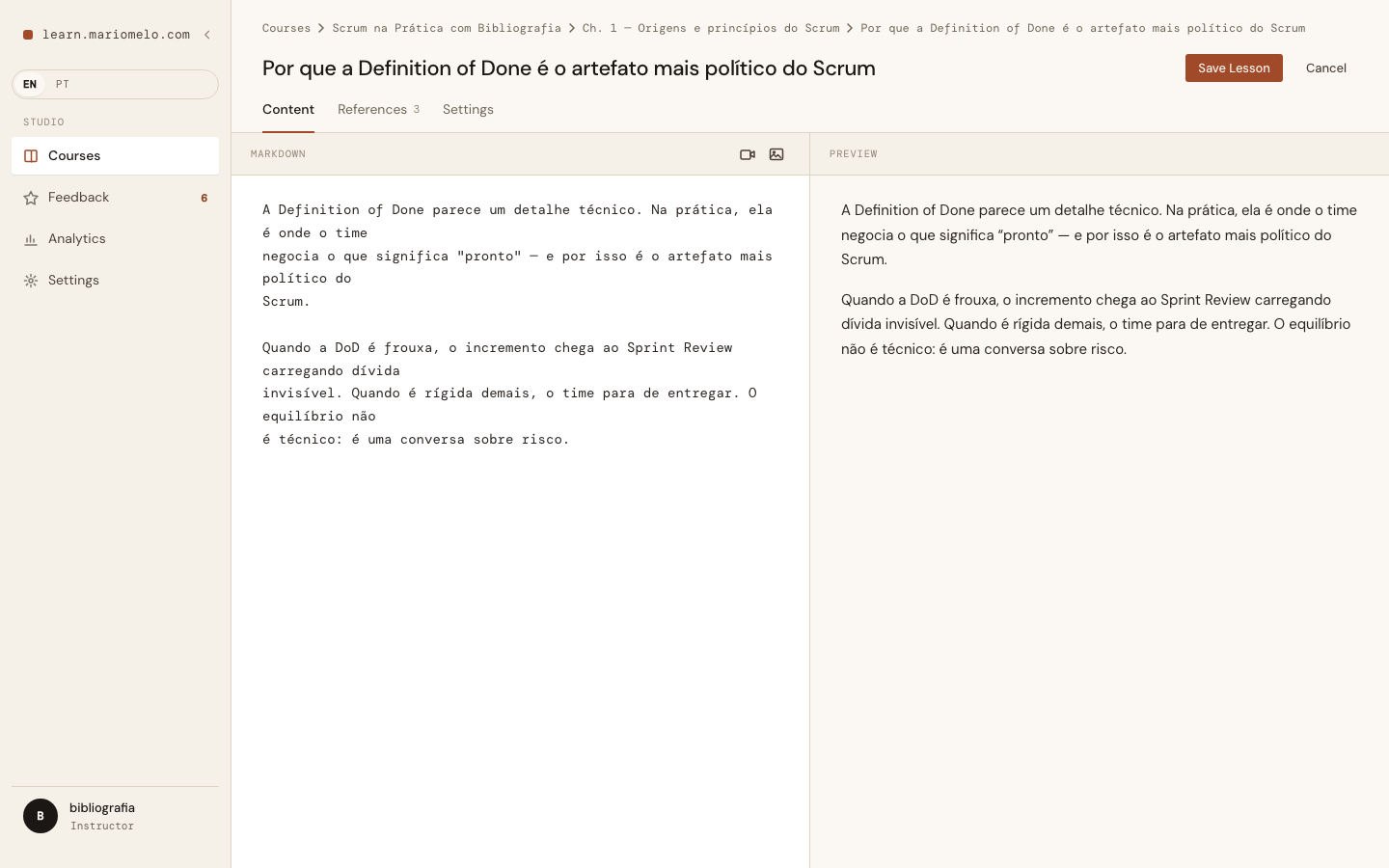
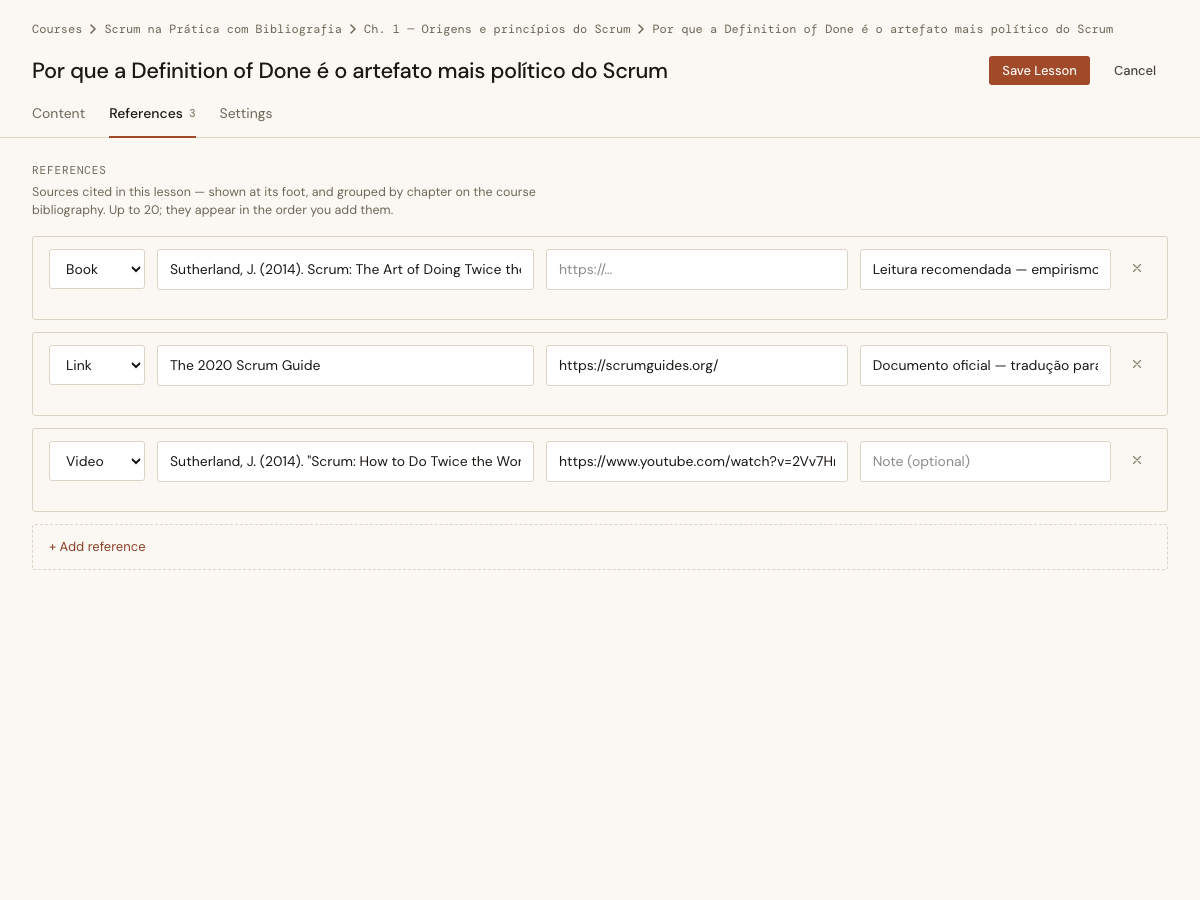
Tabs on a form that submits as one unit have a trap in them, and it’s the same one as before wearing a different hat. Every panel’s inputs belong to #lesson-form through form=, not through nesting — so unmounting the inactive panel takes its inputs out of the submit with it. Save from the Content tab and the payload carries no references key at all, which this save path reads as the Instructor deleted every one of them:
# With every References row removed the form submits no `references` key at
# all. Left absent, `cast` would see no change and the last Reference would
# survive a deliberate deletion.
defp lesson_params(params), do: Map.put_new(params, "references", [])
That line is right — it’s what makes deleting the last Reference stick — and it’s exactly what makes an unmounted tab dangerous. So the panels are hidden with display: none and never unmounted, and four tests hold the line: saving from each tab, and the Free Preview flag round-tripping while its own panel is hidden.
The active tab lives in an assign rather than a client-side class toggle. A class the client added isn’t in the server’s render, so the next phx-change — one keystroke away — patches it straight back out and the panel flips on its own.
One more thing the design system decided for us: its prototype styles tabs as bare .tab and .tabs, and daisyUI ships components under both of those names. Copying the markup verbatim would have collided exactly the way a bare .checkbox once collapsed a label to 21×21 and ate the clicks on the Save button next to it. The classes are lesson-editor-tab*, following the curriculum-tab* the Course page already uses.
Validation is per row, per field, because that’s where the Instructor is looking:
Validation is per row, per field, because that’s where the Instructor is looking:
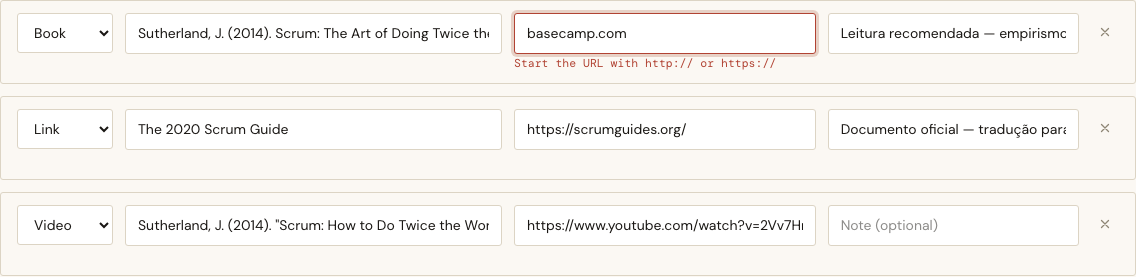
An {:array, :map} field can only carry one flat Ecto error, so the domain returns reasons keyed by row index and the web layer turns them into sentences:
def row_errors(refs) when is_list(refs) do
  refs
  |> Enum.with_index()
  |> Enum.reduce(%{}, fn {ref, index}, acc ->
    errors = field_errors(ref)
    if map_size(errors) == 0, do: acc, else: Map.put(acc, index, errors)
  end)
end
%{2 => %{"url" => :scheme}} — the changeset still gets one error to make the save fail, and the editor gets enough to say where. Reasons rather than strings keeps Forgia.Courses free of the Instructor’s language, the same split every other message in the context already follows.
A URL with no scheme is rejected because basecamp.com in an href resolves against our own host and sends the Student to a 404 on this site. A Reference with no URL is fine — that’s how you cite a print-only book.
The bug that sixteen green tests couldn’t see
Here’s the part worth the post.
The authoring tests were green. Sixteen of them, driving the real tracked form with render_change then render_submit, asserting against the database — exactly the discipline CLAUDE.md demands after hand-built params gave false confidence once before. Then the browser:
%{"_target" => ["lesson", "references", "0", "url"],
  "lesson" => %{"references" => %{"0" => %{"url" => "basecamp.com"}}}}
That’s the entire payload. A phx-change bound to an input reports only that input — not the whole form. Rebuilding the row list from it wiped row 0’s title and note, and deleted rows 1 and 2 outright. Every keystroke.
LiveViewTest’s form helpers serialize everything, so the test harness only ever produced the complete payload — the shape where replacing the rows happens to be correct. The failing shape was unreachable from ExUnit by construction. This is the same category as the daisyUI class collision that made a Save button unclickable while render_submit stayed green: the DOM was fine, the tests were fine, and only a real browser disagreed.
The fix inverts who owns what. The row set belongs to the assign — rows are added and removed by their own events — and the payload is a patch applied on top:
def merge_params(rows, raw) when is_list(rows) do
  incoming = incoming_by_index(raw)

  rows
  |> Enum.with_index()
  |> Enum.map(fn {row, index} ->
    case Map.fetch(incoming, index) do
      {:ok, changes} -> Map.merge(row, changes)
      :error -> row
    end
  end)
end
An index the payload doesn’t mention is left exactly as it was; one it invents is ignored. It’s correct for the partial payload and for the full one the form-level phx-change still sends when the title field changes. Seven tests now pin it, including the one that would have caught it:
test "a single changed field leaves the rest of its row alone" do
  rows = [row(%{"title" => "The 2020 Scrum Guide", "note" => "official"})]

  assert [merged] = Reference.merge_params(rows, %{"0" => %{"url" => "https://x.example"}})
  assert Reference.title(merged) == "The 2020 Scrum Guide"
  assert Reference.note(merged) == "official"
end
Chasing that also surfaced a second, quieter bug: trimming lived in the function the editor round-trips on every keystroke, so typing a space between two words ate it. Trimming moved to the save path, where it belongs.
What the Student gets
At the foot of the Lesson, an endnote — after the last paragraph, before “Mark as complete,” never competing with it:
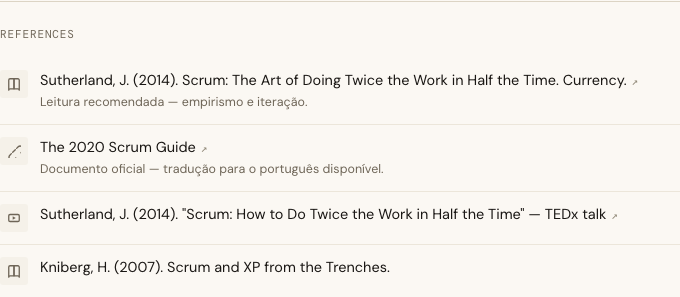
A print-only book renders as plain text rather than a dead link. A Free Preview keeps its References for a logged-out visitor: a preview is a complete taste of that Lesson, and the sources are part of the Lesson.
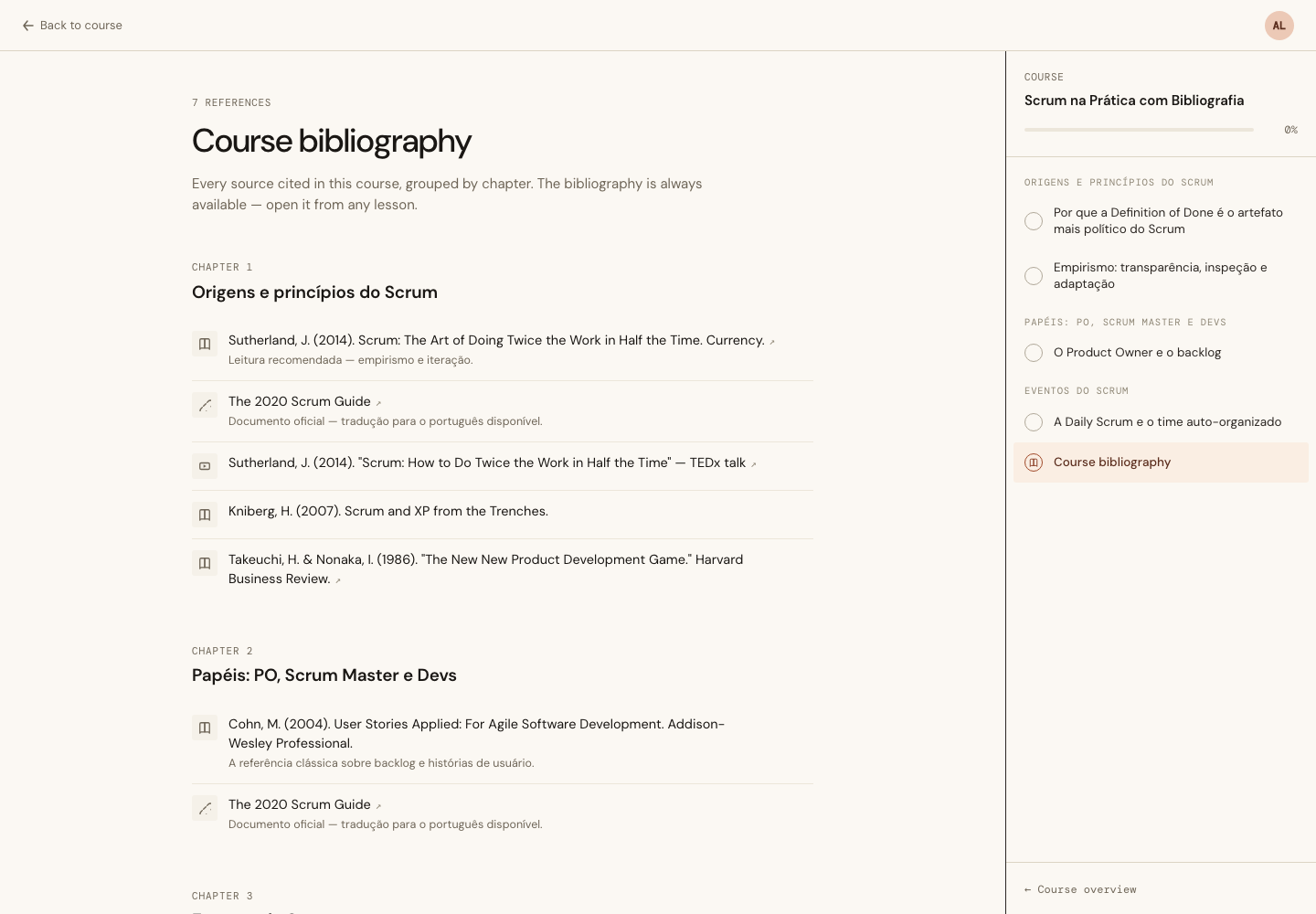
And the compiled page:
Deduping within a Chapter, not across the Course
The Scrum Guide is cited by two Lessons of Chapter 1 and again in Chapter 2. It appears once under Chapter 1 and again under Chapter 2 — and that’s the design, not a leak. The point of the Bibliography is going deeper after each part; a Chapter’s list has to stand on its own, so collapsing across Chapters would hide a source from the reader of Chapter 2.
Matching is on normalized title and URL — case-folded, whitespace collapsed, trailing slash stripped — because an Instructor who typed the same source in three Lessons didn’t type it identically three times:
def dedupe_key(ref) do
  {fold(title(ref)), ref |> url() |> String.trim_trailing("/") |> fold()}
end
type deliberately isn’t part of the key: the same source cited once as a link and once as a video is one source, and first occurrence decides how it shows.
Why it isn’t on the CourseComplete screen
The obvious home for “here’s everything you can read next” is the congratulations screen. It’s the wrong one. CourseComplete redirects away unless the Student is at 100% — so the Student who most wants the sources, the one halfway through Chapter 2, would never reach it. The Bibliography is its own always-reachable route, linked from the lesson sidebar on every Lesson type, including the Quiz and Word Match Lessons that can’t carry References of their own.
In the sidebar it gets a group of its own. The first version put the row at the end of the list, flush under the last Chapter’s Lessons — where it read as a Lesson of that Chapter:
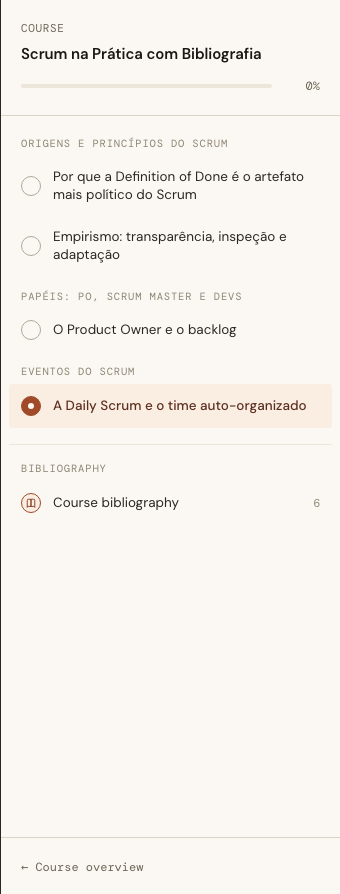
Heading it turned out to be a naming problem rather than a layout one. It’s grouped like a Chapter but it isn’t one, and the glossary had already spent the obvious alternatives: Chapter rules out section, module and unit; Attachment rules out material, resource and download; Bibliography itself rules out reading list, sources and further reading. What’s left is the canonical term, which is the honest answer anyway. A glossary earns its keep when it stops you inventing a fifth word for a thing that already has one.
It’s offered on CourseComplete too, as one more thing to do next rather than a second celebration:

A Course whose Lessons cite nothing gets no link anywhere — not on the sidebar, not on CourseComplete. The route still answers a bookmarked URL with an honest empty state, because a page that exists should say what it is rather than 404 at someone who saved it.
The design said one thing and the acceptance criteria said another
The design-system screens for this landed before implementation, and the authoring rows were drawn inside the Course settings pane, next to Course Highlights, titled “Course references.”
That can’t work. A Course-level list has no Lesson to render at the foot of and no Chapter to group by — it fails two confirmed acceptance criteria outright. The rows were drawn there because that’s where the repeatable-row pattern already lives, which makes it a pointer to a pattern, not a decision about placement. So the markup was reused verbatim and moved into the Lesson editor, and the reasoning went into the item’s Conversation.md rather than staying in someone’s head.
Worth saying plainly: the mockup being wrong about placement didn’t make it wrong. The row shape, the per-row error line with reserved height so an inline message never shifts the rows below it, the icon treatment, the empty state — all of it came straight across.
Numbers
986 tests, 0 failures — 105 new for this item. Fifty-nine are pure ExUnit.Case, async: true over plain data: ordering by numeric index so row 10 sorts after row 9, discarding LiveView’s _unused_* markers, dropping blank rows, the 20-Reference cap, Chapter grouping and dedupe. The rest reach for infrastructure, and only the three the acceptance criteria explicitly sanctioned had to: the form round-trip, the not-enrolled redirect, and the logged-out Free Preview render.
Thirty-eight browser checks across three passes, including document.elementFromPoint on the Save button to prove nothing overlaps it, and an assertion that every reference input reports el.form.id === "lesson-form" despite living in a hidden tab outside the form element.
Auditing those acceptance criteria one at a time before closing the item was worth it on its own. Four of them passed by construction with nothing pinning them: the sidebar link on a Lesson type that carries no References of its own, the CourseComplete card and its suppression, a distinct icon per Reference type, and the three options the type select offers. Six tests went in. None of them failed when written — which is the point. That isn’t finding a bug, it’s finding a missing net, and the difference only shows up months later.
The lesson that keeps repeating on this project: a green suite tells you the code does what the test could express. It says nothing about the shapes the harness can’t produce.