Sometimes access doesn’t come from a checkout. A student buys a workshop off-platform, a partner sends a cohort, someone needs the private bonus course. For those, the Instructor needs to grant access directly. This slice delivers exactly that: a Studio screen to manually enroll people who already have an account into a Published course, by email, one at a time.
It’s the first bite of a larger story. Manual Enrollment started epic-sized — invites for brand-new accounts, CSV bulk paste, personal notes, a GDPR decline path. Rather than swallow it whole, we used the Hamburger Method to slice on account existence: this item (0010) handles people who already have a confirmed account; inviting strangers (with the Profile aggregate, Invited → Active status, and magic-link accept) moves to its own item, 0020.
What was built
The Instructor can now:
- Open a “Manually enroll students” screen from the tab bar of any Published course, showing the course context (title, language, visibility, current enrolled count)
- Add a person by email, one at a time, and see them appear in a live “Ready to enroll” preview
- See each row flagged as valid, already enrolled, or invalid (malformed email, no account, or a duplicate within the batch), with a running valid / duplicate / invalid summary
- Remove a row or clear the whole list
- Send — disabled when there are zero valid rows — and land on a summary showing enrolled, skipped (already enrolled), and the new total
The system enrolls each valid person Active immediately and sends them a notification email naming who enrolled them and into which course. No accept link — their account already exists. Draft courses are rejected; any visibility of a Published course is allowed (private bonus content is the main use case).
The add → classify → send flow
sequenceDiagram
    actor Instructor
    participant LV as EnrollLive
    participant Enr as Forgia.Enrollments
    participant DB as Repo
    participant Mail as UserNotifier

    Instructor->>LV: type email + Enter
    LV->>Enr: preview_status(course, email, batch)
    Enr->>DB: confirmed account? already enrolled?
    Enr-->>LV: :valid | :already_enrolled | {:invalid, reason}
    LV-->>Instructor: row appended, counts updated, field cleared

    Instructor->>LV: click "Enroll N students"
    loop each valid row
        LV->>Enr: manual_enroll(course, email, instructor)
        Enr->>DB: enroll/2 (idempotent, on_conflict: nothing)
        Enr->>Mail: deliver_enrollment_notification(user, course, instructor)
    end
    LV-->>Instructor: success summary (enrolled / skipped / before→after)
Classification (preview_status/3) and the actual write (manual_enroll/3) both live in the Forgia.Enrollments context — the LiveView stays thin, holding only the preview rows and the view state. manual_enroll/3 re-validates at send time (course still published, account still exists, not already enrolled), so the preview is a hint, not the source of truth.
Domain model
erDiagram
    User {
        int id
        string email
        datetime confirmed_at
    }
    Course {
        int id
        string title
        string status
        string visibility
    }
    Enrollment {
        int id
        int user_id
        int course_id
        datetime inserted_at
    }

    User ||--o{ Enrollment : "enrolled via"
    Course ||--o{ Enrollment : "has"
Notice what’s not here: an Enrollment status column. The glossary defines Invited and Active statuses, but this slice only ever produces Active access for already-confirmed accounts — there is no Invited state to represent yet. Adding a half-built status field now would be speculative; it arrives with the invite flow in 0020, where it earns its keep. The slice boundary is also a schema boundary.
manual_enroll/3 reuses the existing Enrollments.enroll/2, which inserts with on_conflict: :nothing — so enrolling someone already enrolled is a silent no-op, with no second row and no second email.
Screenshots
Entry point: a new tab on Published courses
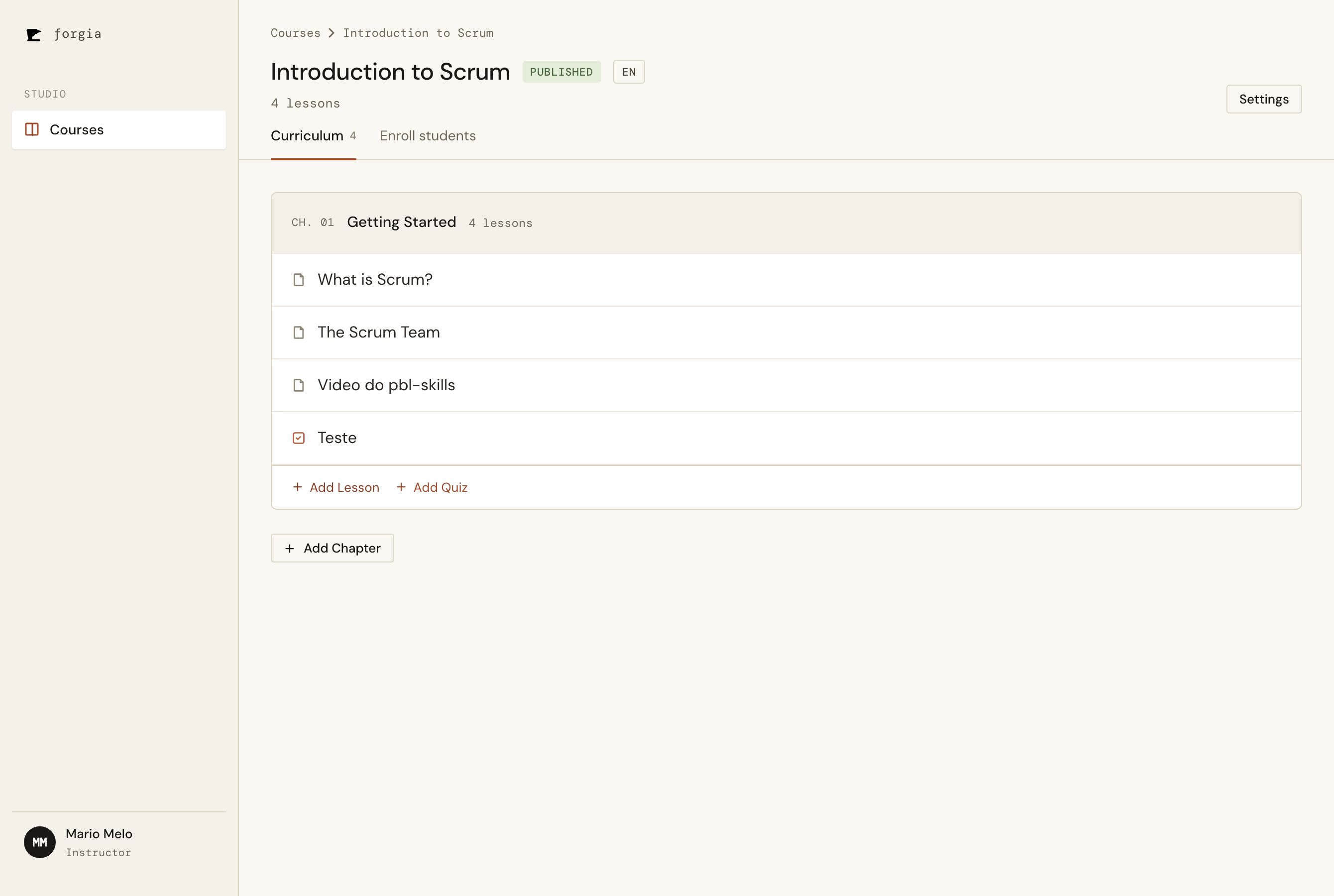
The course Studio gains an "Enroll students" tab next to "Curriculum" — shown only when the course is Published, since manual enrollment requires a Published course.
Empty state
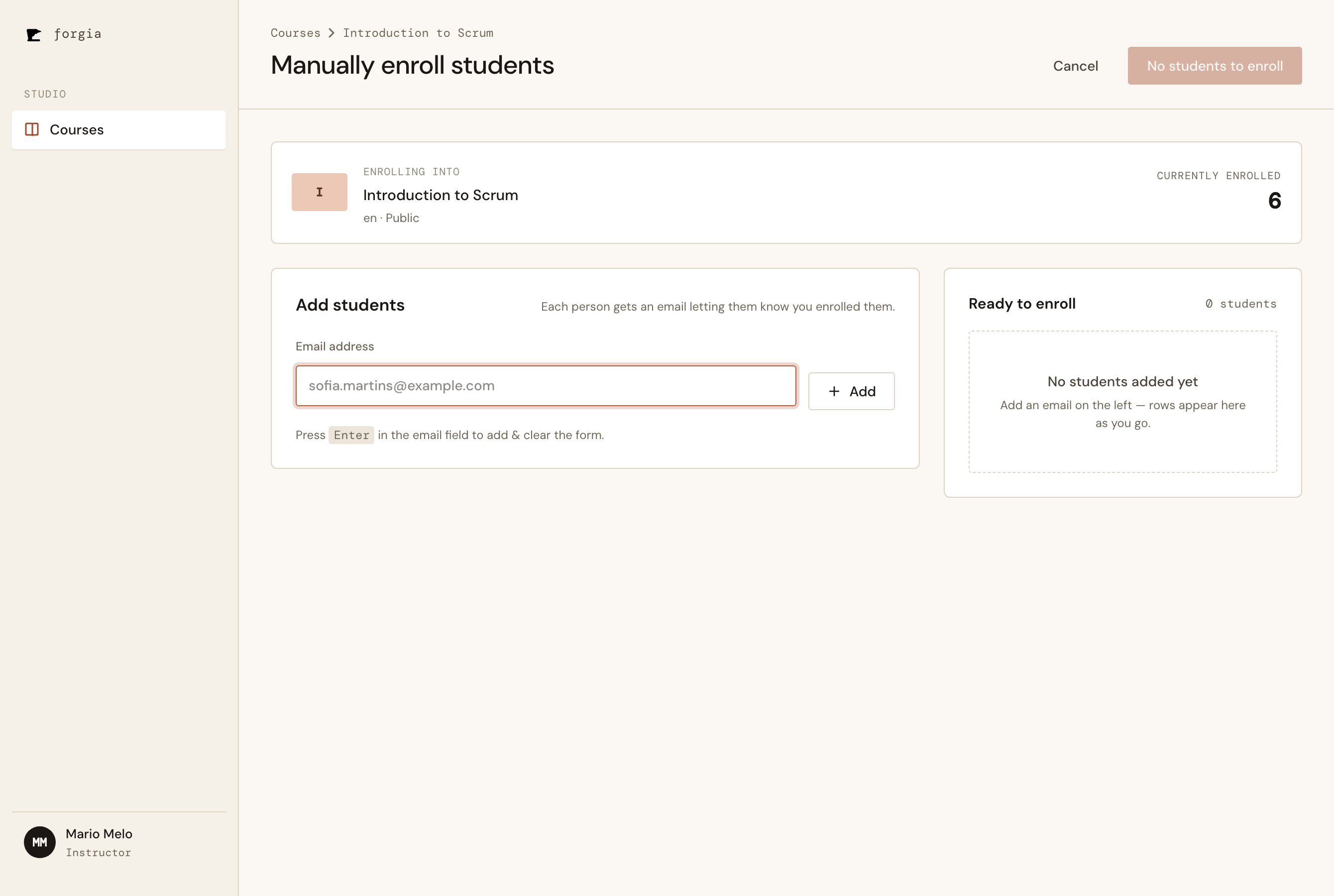
The course context bar shows what you're enrolling into and the current headcount. The Send button is disabled — "No students to enroll" — until there's at least one valid row.
Live preview with flagged rows
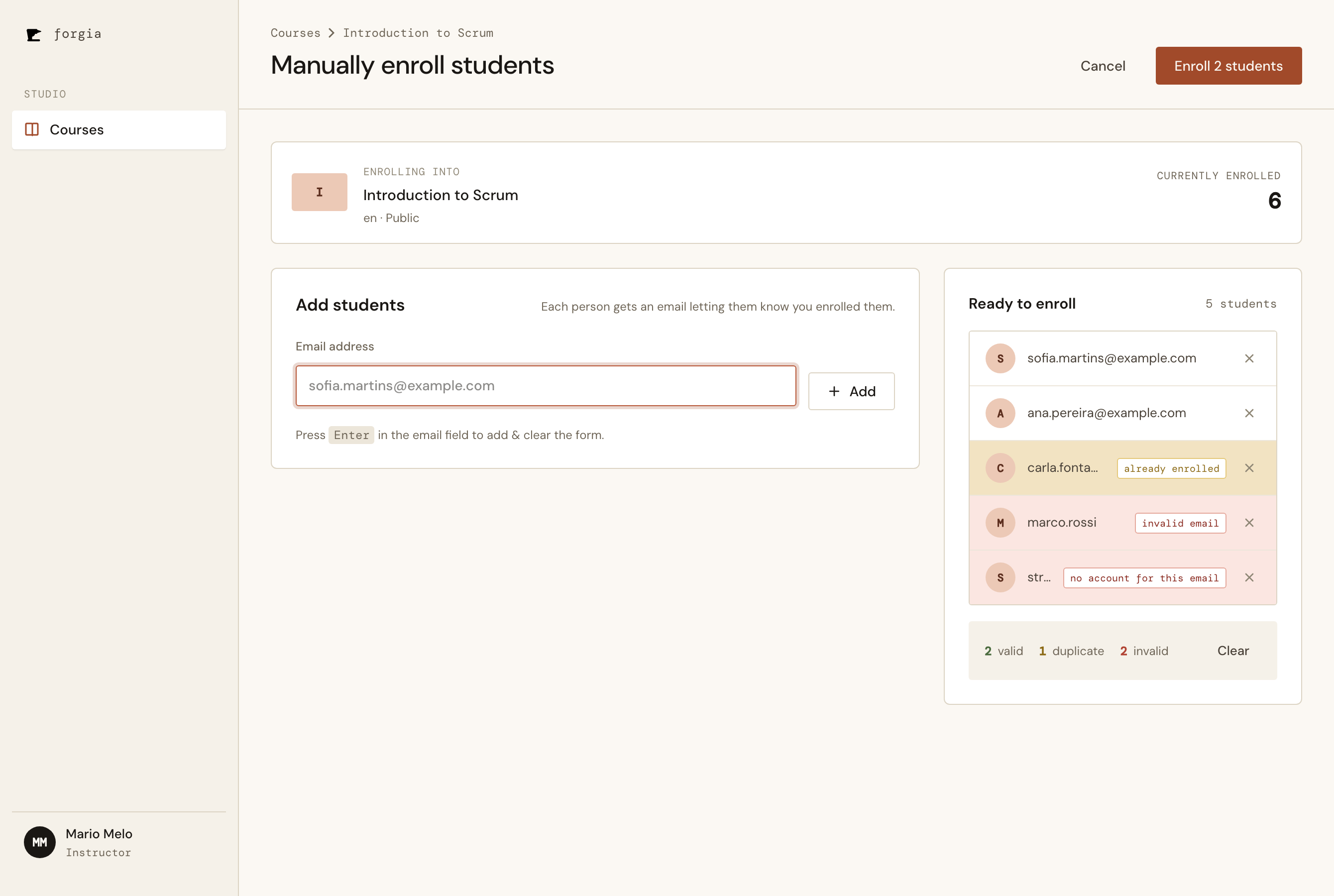
Each added email is classified instantly: two valid rows, one "already enrolled" (amber), and two invalid (rust) — one malformed, one with no account. The running summary counts valid / duplicate / invalid, and the field clears after every add for fast keyboard entry.
Success summary
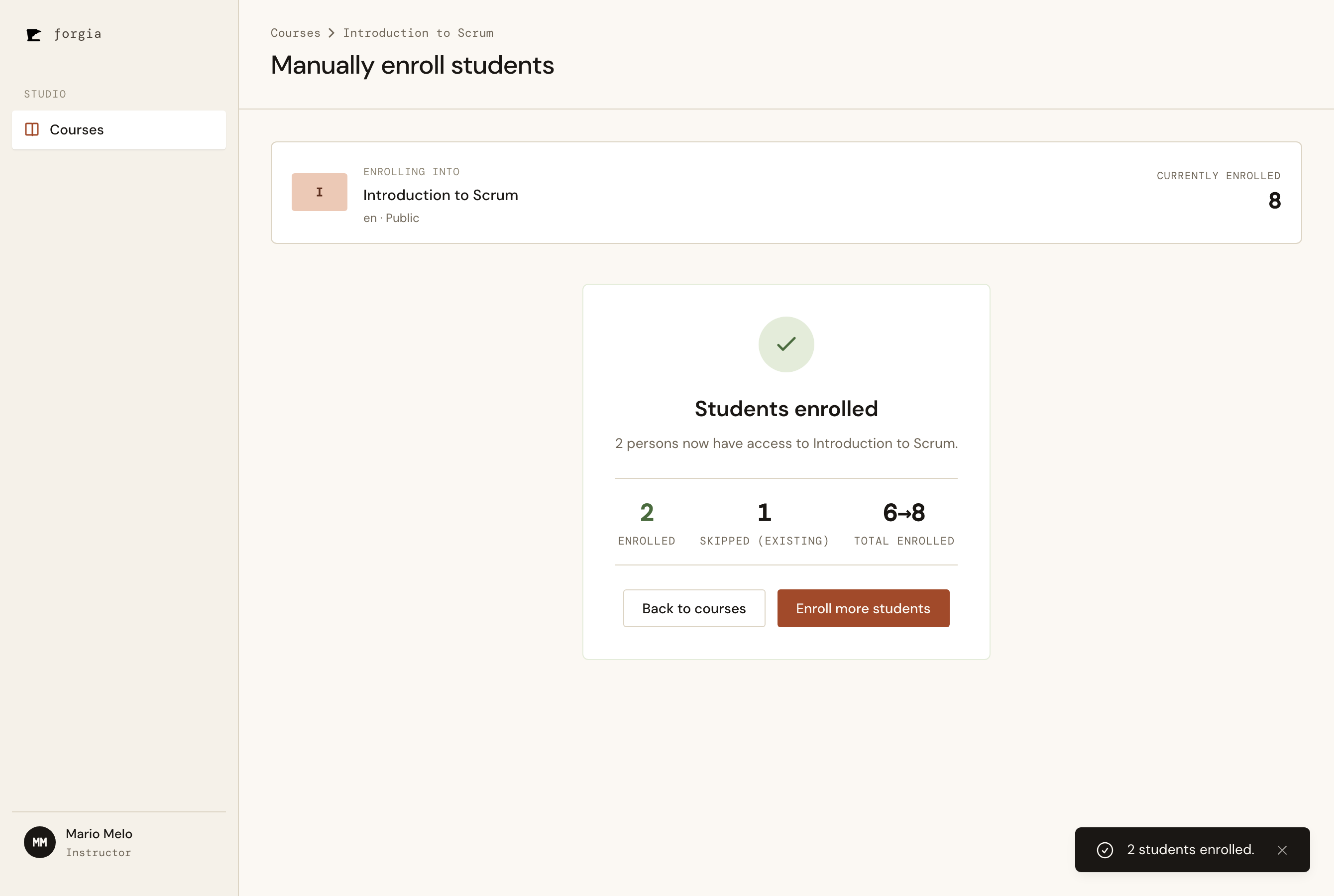
After sending: 2 enrolled, 1 skipped (already enrolled), total 6 → 8. The toast confirms the action — flash rendered by the custom full-page LiveView itself.
Acceptance criteria
- Open a "Manually enroll students" screen from a Published course, showing course context
- Add a person by email and see them in a live "Ready to enroll" preview
- Each row flagged valid / already-enrolled / invalid, with running counts
- Remove a row or clear the whole list
- Send disabled at zero valid rows; success summary shows enrolled / skipped / new total
- Reject manual enrollment into a Draft course; allow any visibility of a Published course
- Valid email → Active enrollment immediately + a notification email naming the Instructor and course
- Email with no account → flagged invalid, excluded from send (never creates an account)
- Already-enrolled email → skipped;
enroll/2stays idempotent (no second row, no second email) - Only the Instructor can reach and use the screen
Key decisions
Slice on account existence (Hamburger Method) — The epic was cut so the first deliverable is the smallest useful one: direct enrollment of existing accounts, email only. Everything that exists solely to handle strangers — the Profile aggregate, the Invited → Active lifecycle, account creation, magic-link accept, the GDPR decline surface — moved to 0020. CSV paste and personal notes ride along with it. The full design stays the north star; we just deliver it in bites.
No status column yet — Because this slice has no Invited state, the Enrollment schema gains nothing. The field lands in 0020 when there’s a second state to hold. Schema follows the domain, not the roadmap.
Domain logic in the context, LiveView thin — preview_status/3 and manual_enroll/3 carry all the rules; EnrollLive just renders preview rows and drives events. manual_enroll/3 re-checks its preconditions at send time, so a stale preview can’t enroll into a course that was unpublished mid-session.
type="text", not type="email" — Verification in the real browser caught it: a native type=email input makes the browser block submitting a malformed address, so our own “invalid email” badge was unreachable and pressing Enter on a typo did nothing. Switching to type="text" (with inputmode="email") lets the domain do the validating and gives consistent feedback.
Keying the input id to clear it after submit — LiveView preserves the value of a focused input across patches, so the just-added email lingered in the field. Rendering the input with an id keyed to the row count makes each successful add mount a fresh, auto-focused, empty field — pure LiveView, no JS hook. Both of these were found by actually running the screen, not by the green test suite — a reminder that “tests pass” and “works in the browser” are different claims.
Next up: PBI 0020 — Invite Students (the Profile aggregate, Invited → Active via magic link, CSV bulk paste, and the GDPR decline path).